• Home
  • Member
  • special offer
  • Info!!
12 May, 2026
Useful tech tips and tricks you should know
  • Home
  • Downloads
  • Google for Huawei
  • Shortcut iPhone/iPad
  • APK for Android TV or Android TV Box
  • APK FRP & APK Files
  • How to install Google on Huawei
  • Huawei ID Remove
  • Home
  • Downloads
  • Google for Huawei
  • Shortcut iPhone/iPad
  • APK for Android TV or Android TV Box
  • APK FRP & APK Files
  • How to install Google on Huawei
  • Huawei ID Remove
ActiveHard Reset & FRP UnlockTodayUncategorized

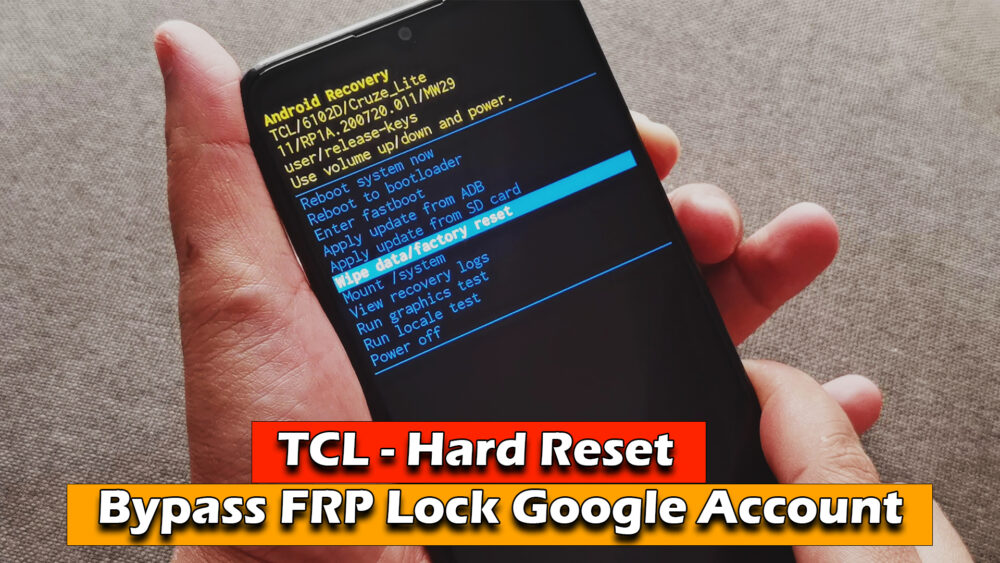
TCL Phone – Hard Reset & Bypass FRP Lock Google Account

adminTháng Một 2, 20230 Comment12.7k

– Hello everyone, in today’s video I would like to share with you how to “TCL Phone – Hard Reset & Bypass FRP Lock Google Account”

TCL Phone – Hard Reset & Bypass FRP Lock Google Account

Download File | https://ictfix.net

READ MORE

FREE | TFTUnlock Tool v2.0.22

FREE | ACT Unlock Tool V2.0

If your Install is successful, please donate to ME, Thanks!

👍👍👍 http://bit.ly/donatePhoneGaming

———————————-

FOLLOW US 👍

▶️ https://ictfix.net/

▶️ FACEBOOK: https://www.facebook.com/gsmfixchannel/

▶️ SUBSCRIBE: https://goo.gl/EfqA7U

▶️ GOOGLE+: https://goo.gl/RYW8j5
  • tcl phone bypass google account
  • tcl phone frp lock
  • tcl phone hard reset
  • tlc
Share
Xiaomi 12T Pro League of Legends Wild Rift Gaming test | Snapdragon 8+ Gen 1, 120Hz Display Previous post
Xiaomi 12T Pro FIFA Mobile Gaming test | Snapdragon 8+ Gen 1, 120Hz Display Next post

Related Articles

ActiveGamingTodayUncategorized

How to Turn Off “Smart App Control Has Blocked This App” in Windows 11

adminTháng Năm 12, 2026
ActiveGamingTodayUncategorized

Installing SideStore & LiveContainer iOS 26.4.x Install Unlimited Apps on iOS & iPadOS(No Jailbreak)

adminTháng Năm 11, 2026
ActiveGamingToday

How to Fix Android Auto Voice Commands Not Working

adminTháng Năm 8, 2026
ActiveGamingTodayUncategorized

Turn Telegram into UNLIMITED Cloud Drive via Termux

adminTháng Năm 3, 2026

Trả lời Hủy

Email của bạn sẽ không được hiển thị công khai. Các trường bắt buộc được đánh dấu *

Recent Comments

  • How to fix Game Mode not working on Windows 10 - ICTfixOn

    How to fix This app has been blocked for your protection error on Windows 10

  • blog3001On

    How to Reset Your Windows 10 Laptop, PC

  • FrancisOn

    Samsung Galaxy A50 update & gameplay FORTNITE – NEW April 2020

Recent Posts

  • ActiveGamingTodayUncategorized

    How to Turn Off “Smart App Control Has Blocked This App” in Windows 11

    Tháng Năm 12, 2026
  • ActiveGamingTodayUncategorized

    Installing SideStore & LiveContainer iOS 26.4.x Install Unlimited Apps on iOS & iPadOS(No Jailbreak)

    Tháng Năm 11, 2026
  • ActiveGamingToday

    How to Fix Android Auto Voice Commands Not Working

    Tháng Năm 8, 2026
  • ActiveGamingTodayUncategorized

    Turn Telegram into UNLIMITED Cloud Drive via Termux

    Tháng Năm 3, 2026

Categories

Active2255
Android Tv & Android Tv Box28
Gaming3059
Hard Reset & FRP Unlock376

About us

Mauris mattis auctor cursus. Phasellus tellus tellus, imperdiet ut imperdiet eu, iaculis a sem imperdiet ut imperdiet eu.

Recent Posts

  • 1
    ActiveGamingTodayUncategorized

    How to Turn Off “Smart App Control Has Blocked This App” in Windows 11

    Tháng Năm 12, 2026
  • 2
    ActiveGamingTodayUncategorized

    Installing SideStore & LiveContainer iOS 26.4.x Install Unlimited Apps on iOS & iPadOS(No Jailbreak)

    Tháng Năm 11, 2026
  • 3
    ActiveGamingToday

    How to Fix Android Auto Voice Commands Not Working

    Tháng Năm 8, 2026
  • 4
    ActiveGamingTodayUncategorized

    Turn Telegram into UNLIMITED Cloud Drive via Termux

    Tháng Năm 3, 2026

Chuyên mục

  • Active 2.255
  • Android Tv & Android Tv Box 28
  • Gaming 3.059
  • Hard Reset & FRP Unlock 376
  • Health 3
  • How to install Google on Huawei 250
  • macOS 38
  • Profile Beta OS 27
  • Science 3
  • Sports 56
  • Today 1.591
  • Uncategorized 1.195
  • About Us
  • Private policy
  • Forums
  • Community
Our Spring Sale Has Started

You can see how this popup was set up in our step-by-step guide: https://wppopupmaker.com/guides/auto-opening-announcement-popups/