
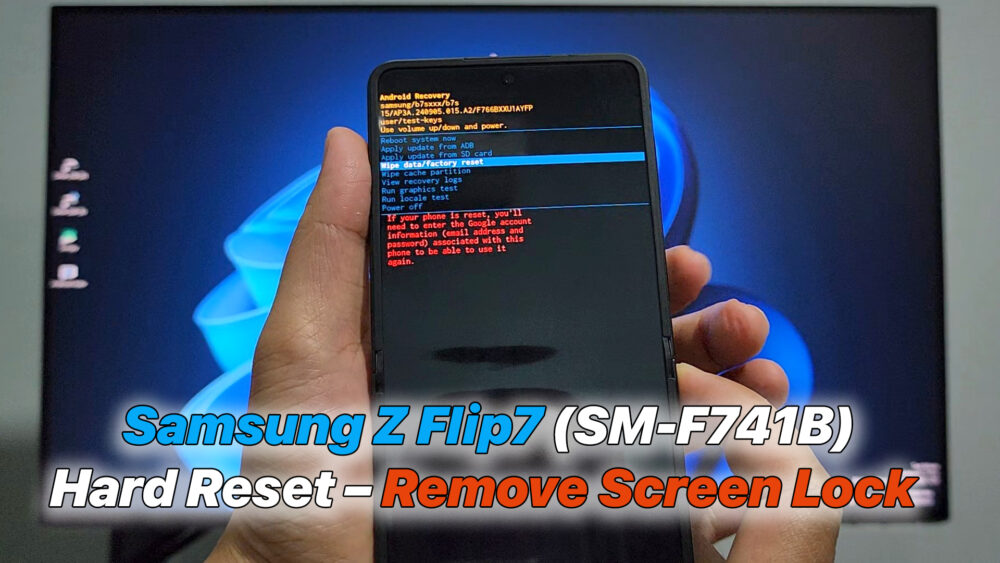

Samsung Galaxy Z Flip7 (SM-F741B) Hard Reset – Remove Screen Lock
Step-by-step guide to hard reset Samsung Galaxy Z Flip7 (SM-F741B) and remove screen lock. Easily restore factory settings and unlock your phone.
📌 How to Hard Reset Samsung Galaxy Z Flip7 (SM-F741B) – Remove Screen Lock
📌 How to Hard Reset Samsung Galaxy Z Flip7 (SM-F741B) – Remove Screen Lock
Step 1: Power off your Samsung Galaxy Z Flip7.
– If the device is stuck on the lock screen, hold Power + Volume Down until it turns off completely.
Step 2: Boot into Recovery Mode.
– Press and hold Volume Up + Power buttons together.
– When the Samsung Galaxy Z Flip7 logo appears, release the Power button but keep holding Volume Up until Android Recovery Mode shows up.
Step 3: Navigate in Recovery Mode.
– Use Volume Up/Down buttons to move.
– Use the Power button to confirm.
Step 4: Select Wipe data/factory reset.
– Confirm by choosing Factory data reset → all data (including screen lock, password, fingerprint, pattern) will be erased.
Step 5: Reboot the device.
– Choose Reboot system now to finish.
👉 After reboot, your Samsung Galaxy Z Flip7 (SM-F741B) will be restored to factory settings and the screen lock will be removed.
⚠️ Note: After a Hard Reset, the phone may require you to log back into your Google account (FRP – Factory Reset Protection).
READ MORE
Remove Bloatware on Android 13 to 16 with Shizuku & Canta (No Root)
https://youtu.be/MUnSO7ajmgs
How To ROOT Samsung Galaxy Z Fold3 Android 15 (Magisk)
If your Install is successful, please donate to ME, Thanks!
👍👍👍 http://bit.ly/donatePhoneGaming
———————————-
FOLLOW US 👍
▶️ FACEBOOK: https://www.facebook.com/gsmfixchannel/
▶️ SUBSCRIBE: https://goo.gl/EfqA7U
▶️ GOOGLE+: https://goo.gl/RYW8






Để lại một bình luận